Prepare an experiment here, export it, and share it in chat. The agent can run Python jobs on a paired Colab GPU, retrieve results and checkpoints, and stop the runtime through the private Lab CLI.
This page saves drafts; it does not launch jobs or show live runtime status. The connection was verified on October 5, 2026, and the test GPU was stopped afterward.
how to run an experiment
- Save a draft below, then export it and share the file in chat.
- Ask the agent to start a Colab session. Each new runtime needs one browser startup and pairing.
- Once paired, the agent submits jobs, checks results, downloads output files and stops the runner through the CLI.
Current runner limits: 60 minutes total per session, with automatic stop after 10 idle minutes. A job's timeout is also bounded by the time left in its session. Colab can end a runtime sooner.
Returned files are limited to 512 KiB each and 768 KiB total per job. Larger datasets and checkpoints need a separate transfer plan.
privacy and access
The runner keeps its private key in Colab. Google login credentials are not copied into Cloudflare, and Google Drive is not mounted. Job code, logs and selected output files pass through the private Cloudflare bridge and are kept for about seven days.
Keep passwords, API keys and Google authorization codes out of drafts. Drafts stay in this browser until you export them. The Google sign-in session is held in the OpenAI cloud browser.
verified GPU training run
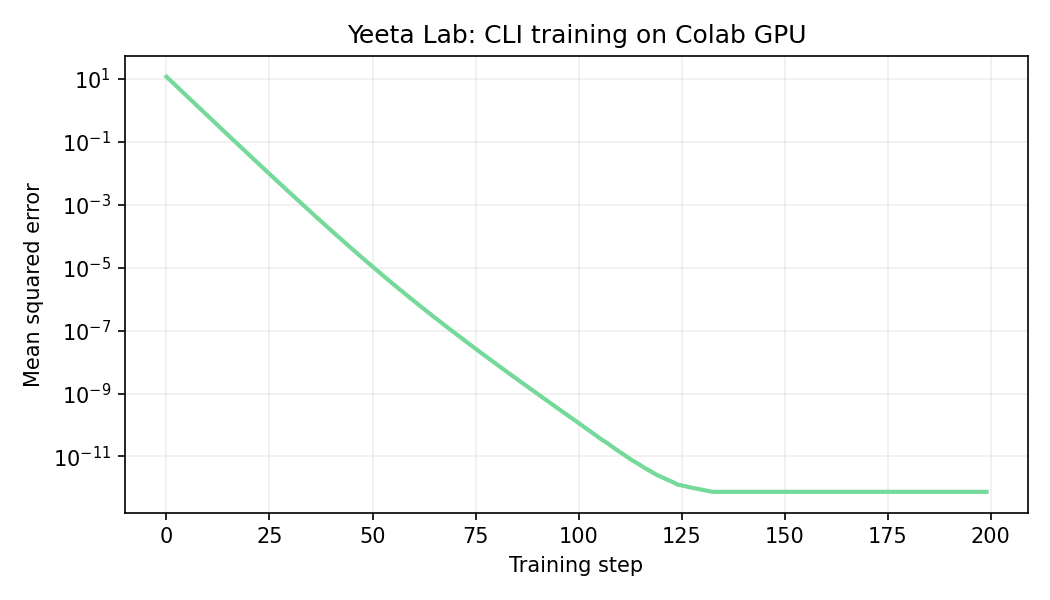
A small model learned y = 3x − 1 from synthetic data on a Tesla T4. The agent submitted it through the CLI, retrieved the model and chart, and stopped the GPU.
- training steps
- 200
- starting error
- 11.65
- final error
- 7.54 × 10⁻¹³
- full job
- 15.46 seconds
view loss chart and results
download results JSON · download test model
Historical test result, not a live job. Uses synthetic data only.
new experiment
experiments
Drafts are saved in this browser only. Export a copy to share in chat or keep a backup.